
Dynamic Metal Price Calculator
Real-time Jewellery Pricing for WooCommerce
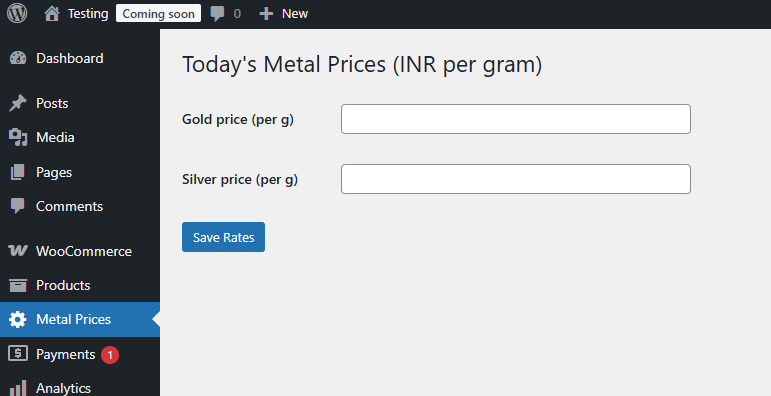
Admin Metal Rates page
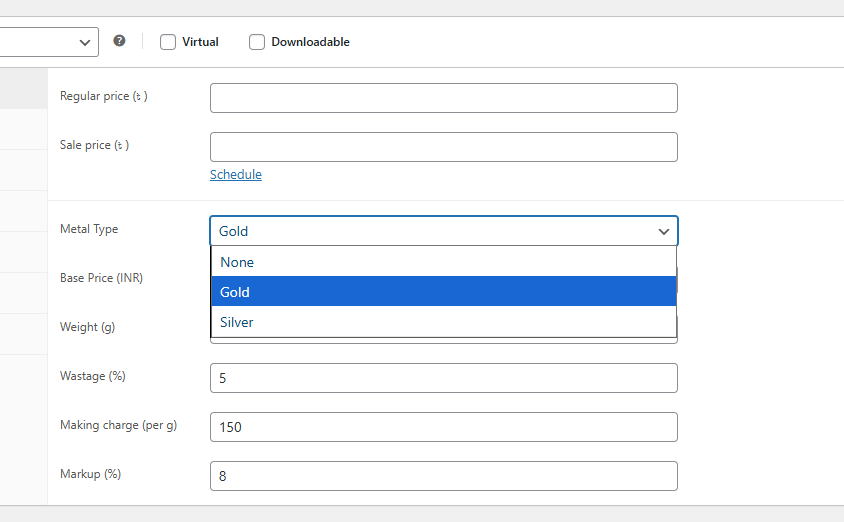
WooCommerce Product Edit Screen

Dynamic Price Display on Frontend
On the product page, customers will see a real-time calculated price. The formula:Final Price = Base Price + (Metal Price × Weight) + Wastage + Making Charge + Markup
This ensures your prices always reflect live market rates, providing trust and transparency to buyers.
Exact Math Formula
how final price is calculated
Pricing Formula (Step‑by‑Step)
1) Base determination
base = (base_price is set) ? base_price : (metal_rate × weight)
2) Apply wastage (%)
after_wastage = base + (base × (wastage / 100))
3) Add making charge (per g)
after_making = after_wastage + (making_charge × weight)
4) Apply markup (%)
final_price = after_making + (after_making × (markup / 100))
5) Rounding
Final value is rounded to two decimal places for display/currency precision.
Worked Numeric Example (Digit‑by‑Digit)
metal_rate = 85.50 (per gram)
weight = 10.00 g
base_price = not set (compute from metal)
wastage = 2.00%
making_charge = 5.00 (per g)
markup = 10.00%
Step 1 — base:base = metal_rate × weight = 85.50 × 10.00 = 855.00
Step 2 — wastage:after_wastage = base + (base × (wastage / 100))wastage portion = 855.00 × (2 / 100) = 17.10after_wastage = 855.00 + 17.10 = 872.10
Step 3 — making charge:making total = making_charge × weight = 5.00 × 10.00 = 50.00after_making = 872.10 + 50.00 = 922.10
Step 4 — markup:markup portion = after_making × (markup / 100) = 922.10 × 0.10 = 92.21final_price = after_making + markup portion = 922.10 + 92.21 = 1,014.31
Step 5 — rounding: final price = 1,014.31 (rounded to 2 decimals).
Notes & Best Practices
If you want to price in a different currency than your metal rate source, convert the metal rates externally and enter the converted values. The plugin does not auto‑fetch FX rates.For multi‑currency storefronts, maintain per‑store metal rates. Leave the regular price blank on products where you want the computed price to take precedence. If a sale price is set, the plugin temporarily uses it as the base for the computation (then restores state).
v1.0.2 — Highlight
Fixed multiple bugs; added automatic currency symbol detection; improved escaping and translation context; updated admin UI labels.